
CSS Grid Layout
You can now turn any layout element (section, container, block, div) into a CSS grid layout by setting the Display setting to grid.
Documentation: https://academy.bricksbuilder.io/article/css-grid-layout/
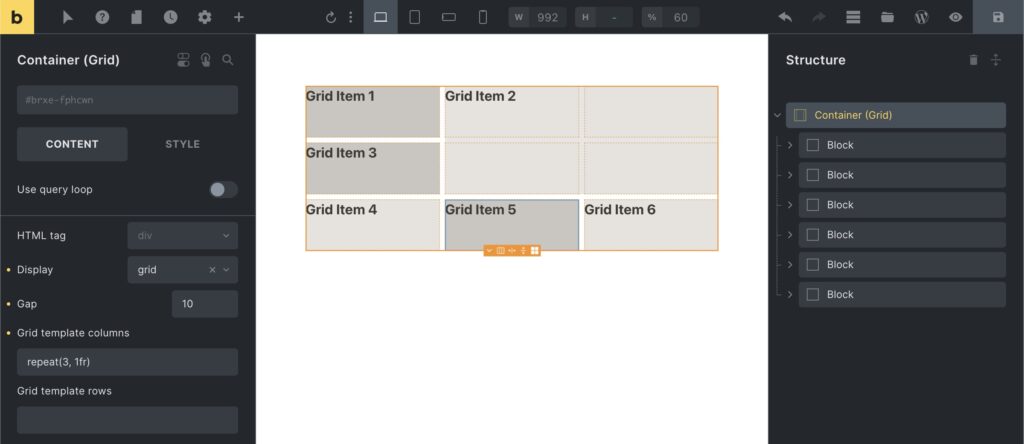
Full changelog
- CSS Grid LayoutNew
- Open “Mini Cart” after product is added to cartNew
- Woocommerce: AJAX “Add to cart” button (single product)New
- New DD tag: {woo_product_stock_status} (useful for element conditions)New
- DD tag {woo_product_stock} supports ‘value’ filterNew
- Page Settings > SEO: New “Document Title” settingNew
- New setting: “Direction” under Style > Layout > Flex (for non-layout elements)New
- Search element: Add overlay ‘Title tag’ settingNew
- Search element: Add “for” attribute to form label (a11y)New
- Video element: New iframe “title” settingNew
- Remove background-color: transparent from “a” (normalizeCSS)Improve
- WooCommerce: Related Product CSS problem with breakpointsFix
- WooCommerce: Order Receipt template woocommerce_receipt_ action hook missingFix
- WooCommerce classes on body tag all across the siteFix
- WooCommerce: Products element has wrong aria-label on image linkFix
- Sticky header: background-color transition missing .brxe-block selectorFix
- Overlay/Gradient: Specificity issue with #id > *Fix
- Popups & Interactions: JS console errorsFix
- Popup A merged/added into popup B, etc.Fix
- Missing Popup styles in paginated loopFix
- Posts element: Initial load in builder incorrect styleFix
- Posts element: Masonry layout empty on canvasFix
- Video element: Dynamic data for Vimeo URL not renderedFix
- Video element: Overlay image style not generated in query loop (frontend)Fix
- Image Gallery: Caption positionFix
- Icon SVG inherits CSS properties on all children causes unknown borderFix
- Icon Box element: Theme style “Icon align” not used (external files)Fix
- Map element: Big close image if jQuery not used on current pageFix
- Custom CSS: “root” selector of inserted element gets overridden with ID of the original elementFix
- Nestable Slider: Type “fade” selected, only the first slide is visibleFix
- Sticky Header .slide-up causes content to jump upFix