
Bricks 1.9.4 introduces several new features and improvements. Key additions include:
- Maintenance Mode: https://academy.bricksbuilder.io/article/maintenance-mode/
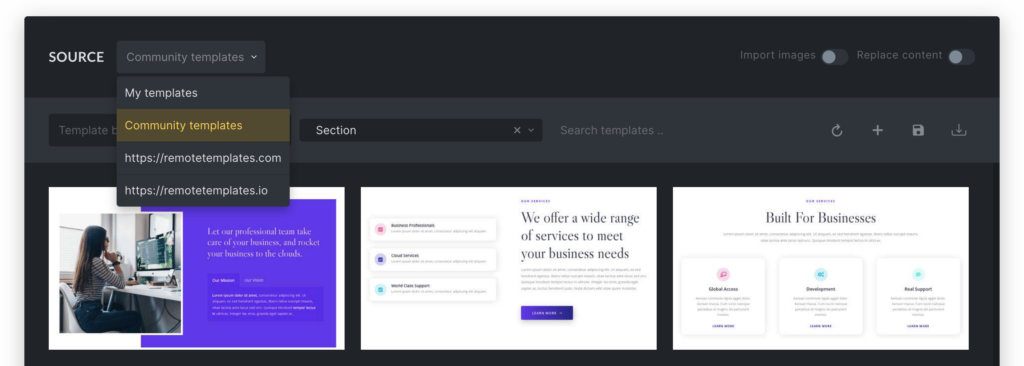
- Unlimited Remote Template URLs: https://academy.bricksbuilder.io/article/remote-templates/
- AJAX-based Popup Render: https://academy.bricksbuilder.io/article/popup-builder/#ajax
You can now utilize a new popup setting for display on specific breakpoints and create or select template tags directly in the builder when creating/saving a new template.
Enhanced gradient options for conic and radial gradients are available, along with a new filter for modifying image size options (bricks/builder/image_size_options). Scroll snap now includes an “unset” option to disable scroll snap on specific breakpoints.
Language codes are automatically shown for pages in the builder when using WMPL & Polylang. Custom Login Page now supports the “redirect_to” URL parameter.
Improvements focus on functionality enhancements like hiding the ‘Load More’ button in the Query loop when there are no results, improved WPML and Template element translations.
Full changelog
- Maintenance ModeNew
- Unlimited Remote Template URLsNew
- Popup render via AJAXNew
- Popup: New “Display on breakpoints” popup settingNew
- Create & select template tags when creating a template in the builderNew
- Gradient: New conic and radial gradient settings (shape, position, size, angle)New
- New filter: bricks/builder/image_size_options (to modify image size options in the builder)New
- Scroll snap: Add “unset” option (to disable scroll snap on specific breakpoint)New
- WMPL & Polylang: Add language code to post title (in builder panel)New
- Mini Cart element: New setting “Don’t close on click outside mini cart”New
- Custom Authentication Pages: Access default WP login page via URL param “brx_use_wp_login”New
- Custom Login Page: Support “redirect_to” URL parameterImprove
- Load more (Query loop): Hide button when there are no resultsImprove
- WPML & Template element: Use the translated “Template” elementImprove
- Adobe Fonts: Use CSS names instead of font slugFix
- Condition: “is not” always returns true when comparing against post status (multi-select)Fix
- Copy & paste all elements breaks the structure (in specific instance)Fix
- Counter element: Duration not working correct if count number is very smallFix
- Custom Fonts (admin screen): PHP 8 error with Japanese languageFix
- Dynamic data: “echo” function not rendering with non-roman character argumentsFix
- Dropdown: ::before gets added on mobileFix
- Element classes dropdown: Unable to open the dropdownFix
- Form element: Loading spinner doesn’t show without an icon setFix
- Form element: Reset password action hidden fields not removedFix
- JetEngine: Posts field in the query loop returns empty resultFix
- Nestable Accordion + Infinite scroll or Load more: JavaScript of fetched item not reinitialisedFix
- CMB and Pods: PHP errorFix
- Page Settings: Footer scripts were not save (with Bricks settings “auto-expand panel” enabled)Fix
- Pie Chart element: Support use of CSS variable colorsFix
- Polylang: Use the correct language-specific search templateFix
- Polylang: Media translation issue (with Carousel)Fix
- Posts element: Grid columns breaking (sometimes)Fix
- Reading Progress Bar element: Styling issue on Safari desktop/iOSFix
- Related Posts element: “Max. related posts” is not 3 (when using default single post template)Fix
- Settings injected via bricks/element/settings hook not being used by Carousel or Related PostsFix
- Page settings not applied for post status draftFix
- Spanish translation: Wrong hCaptcha notice labelFix
- Theme update: Missing CSS if element with same custom CSS “id” used on different pageFix
- WooCommerce: Products query settings not reflected on the canvasFix
- WooCommerce: Undefined variable $order (Template: Pay)Fix
- Heading & Basic text element: “0” is not renderedFix